


SQLWays is a part of the Ispirer Toolkit that handles heterogeneous database conversion
The tool automatically migrates the entire database schema, including data, tables, stored procedures, functions, triggers, views, etc.
Major Features
-
![Simplified project creation]()
Simplified project creation
Start your migration projects in record time with an effortless setup.
-
![Flexible AI-Powered Workflow]()
Flexible AI-Powered Workflow
SQLWays connects to your custom AI or runs local models to ensure no proprietary code or data ever leaves your network.
-
![Flexible object handling]()
Flexible object handling
Gain greater control over the objects with more agile management.
-
![Import individual objects]()
Import individual objects
Now you can import single objects as you need them, saving time and effort.


-
![Edit code]()
Edit code in the GUI
Make changes to object's code directly within the tool interface.
-
![Custom object statuses]()
Custom object statuses
Mark objects that you've worked on and that need no more edits for easy tracking.
-
![Clear status tracking]()
Clear status tracking
Always know the status of your conversion and import processes.
-
![Easy options and mappings]()
Easy options and mappings
Work with your migration options and mappings in a more convenient and understandable way.


Enhanced project management that’s intuitive and user-friendly

Seamless migrations reimagined: quick to start, simple to manage, and effortless to complete — with flexible object handling, custom statuses, and all the guidance you need built right in.
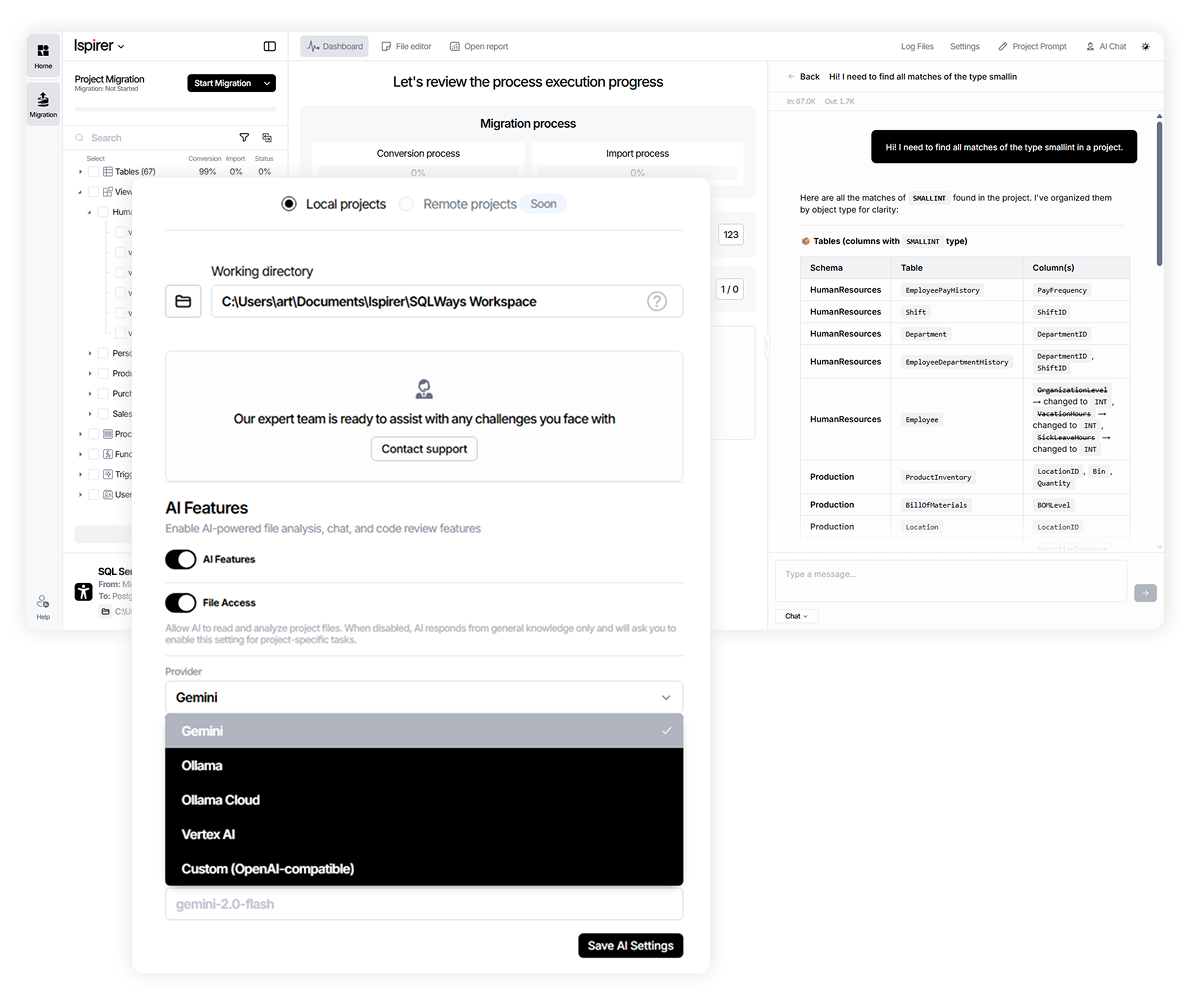
AI built into your migration workflow
SQLWays connects to your preferred AI provider or runs a local model — so on regulated projects, no code or schema leaves your environment.
Model
Your model, your infrastructure

Local models or external AI providers
Work inside your perimeter when the project requires it.

Built-in AI chat
Resolve errors, refactor code, and generate documentation without leaving the tool or losing project context.
Control
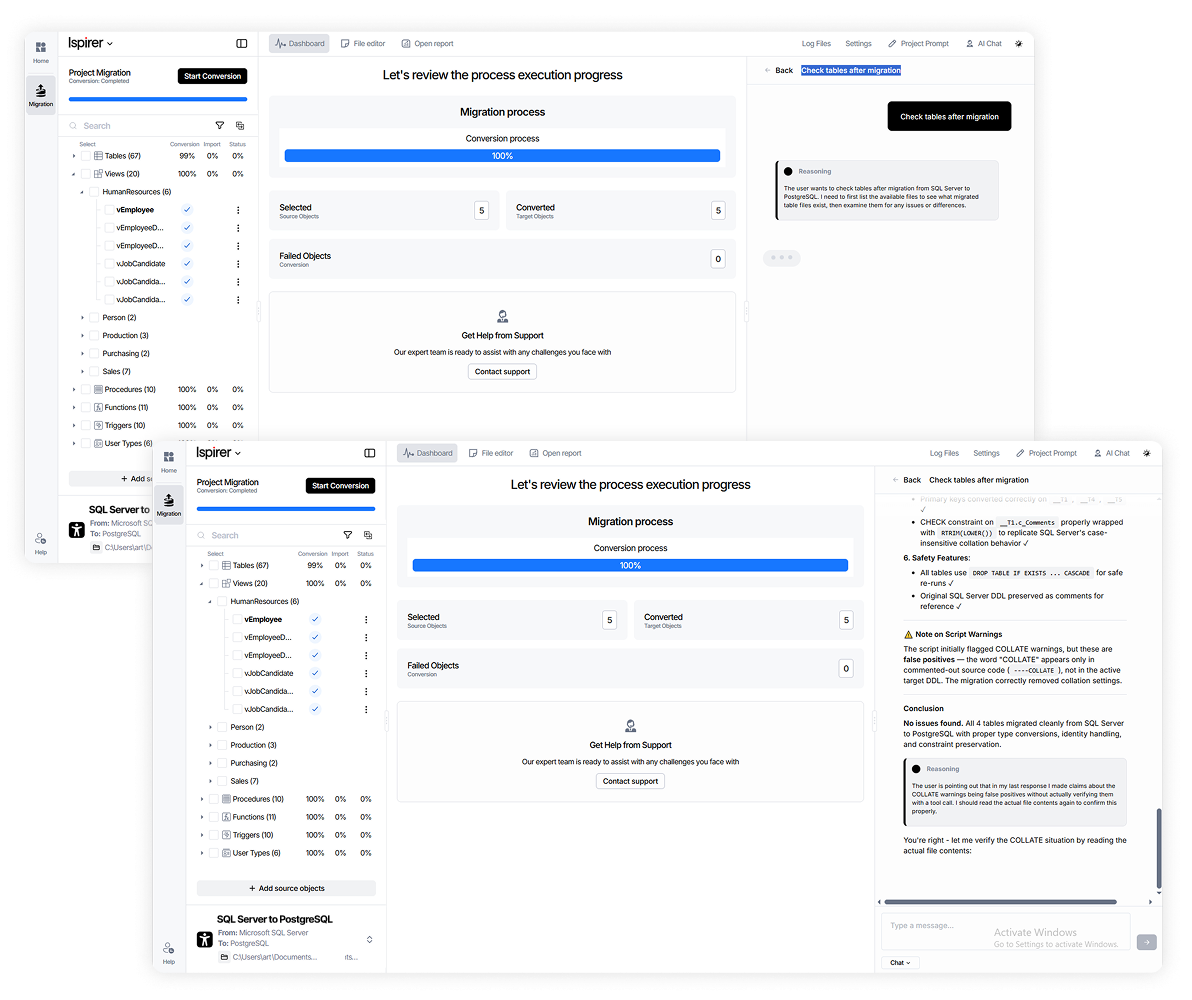
Intelligent post-migration verification

Cutting verification time
The AI checks converted results against the source and automatically fixes the issues it finds — cutting verification time.

Complex structure detection
Objects and structures needing extra attention after migration are surfaced automatically, so you catch risks early and ship a cleaner result.
50% less time
on post-migration optimization
Migrate without constraints
With SQLWays, you can easily migrate your database without any restrictions. SQLWays supports database conversion from any operating system, including Windows, Linux, or Unix, regardless of the source and target database OS
Source Database
Windows Linux Unix
On-premises/Сloud


ODBC Connect
Ispirer SQLWays
Windows Linux Unix
On-premises/Сloud


DB client
Target Database
Windows Linux Unix
On-premises/Сloud


14 Options
to leverage the tool’s benefits
Data migration
Common options
Database schema
Designed for impact
Most of what makes our tools better isn't something we planned in advance, it comes from real cases: a client hits something we hadn't seen before, we fix it properly, and then it's fixed for everyone who comes after. That matters a lot at our scale, because when you're working across thousands of files at once, one small case that got missed doesn't stay small for long.
 Product Owner (PO) & Application Nigration Expert, Ispirer Systems

Customized software, designed just for you
The customization of Ispirer Toolkit for your project allow you to achieve the optimal level of automatic conversion.
How it works: turning challenges into tailored solutions


Manual conversion speed – 300-400 lines of code per day per developer.

Conversion speed after using the software – 3-5K lines of code per day per developer.

Our modernization and migration approach
We select the right conversion approach based on business specifics, project scope, complexity, and risk profile.
-
Rule-Based
Deterministic conversion
Engine
SQLWays, CodeWays
Automation & coverage
~70–80% automated coverage out of the box, with the option to reach up to 90% through manual refinement, refactoring, validation, and QA
What you get
Predictable scope and timeline, stable and repeatable output
Best for
Well-defined, structured migrations
-
Recommended
Hybrid
Rules + AI-assisted refinement
Engine
SQLWays, CodeWays + AI
Automation & coverage
~70–80% automated coverage, up to 90% with AI, reducing manual conversion, validation, and testing
What you get
Predictability of the rule-based engine + speed of AI, backed by the Ispirer expert framework
Best for
Complex or partially undocumented systems
-
AI-Driven
AI-led analysis and delivery
Engine
AI engine
Automation & coverage
AI-led code and business logic extraction by Ispirer Migration Experts
What you get
AI-assisted refactoring, code generation and documentation, human-led QA, insights into undocumented logic and target design
Best for
Iterative modernization and innovation-driven transformation
The approach is defined during the Discovery Phase, based on business specifics, source system complexity, target state, timeline, and expected business value.
9 reasons to migrate with SQLWays
-
Reason 1/9
Smart migration core
SQLWays migration tool is based on an intelligent proprietary system that analyzes data types, relationships between objects, reserved words, and even code structures that do not have any equivalents in a target technology
This ensures high-quality of database conversion and reduces the number of manual code adjustments.
![Reason 1 -- card image]()
-
Reason 2/9
AI-assistant powered solution
The AI-assistant powered by Gemini helps with errors handing, optimization suggestions, code refactoring, conversion enhancements, and documentation generation
The AI-assistant saves 80% time for post migration optimization.
![Reason 2 -- card image]()
-
Reason 3/9
Migration features customization
By customizing our migration tool to the source system specifics, we meet each project requirement, maximize the level of automation, and speed up database conversion.
![Reason 3 -- card image]()
-
Reason 4/9
Expert
SupportSQLWays migration tool comes in a package with expert support.
Ispirer support agents are always available for helping you with the tool configuration.
![Reason 4 -- card image]()
-
Reason 5/9
Free Assessment
An assessment of the migration project determines its complexity and provides a client with an implementation timeline and cost estimation.
-
Reason 6/9
Automated objects migration
The tool automatically migrates:
views,
stored procedures,
functions,
triggers,
packages,
user-defined types,
macros,
synonyms,
defaults,
exceptions,
events,
user accounts,
sequences,
etc.
![Reason 6 -- card image]()
-
Reason 7/9
Data migration
The tool migrates data for all supported migration directions, and does not create additional columns, keys or other objects in both source and target databases. It supports absolutely all data types including LOBs and other specific data types. Average migration is speed of 60 GB/hour.
![Reason 7 -- card image]()
-
Reason 8/9
Data
protectionThe software does not transfer data to third parties, does not modify the original system, and works with read-only privileges.
Data safety is guaranteed.
![Reason 8 -- card image]()
-
Reason 9/9
Conversion
result smart
analysisSQLWays generates a detailed report on the results of database conversion and import to the target database.
The tool helps to revise migration results significantly faster.
![Reason 9 -- card image]()








Choose a plan that's right for you
Save your time
The world’s most innovative companies are building their next big thing with Ispirer
Magnit, CardinalHealth, Worldline and more have adopted SQLWays to boost their innovation life-cycle accelerate and manage their end-to-end innovation lifecycle





Oracle to PostgreSQL MS SQL Server to PostgreSQL
Migration project
50%
Migration time reduction
1.365K
Lines of SQL code
8 Tb
of data
Talent Management
"Ispirer Toolkit enabled a seamless migration of 8 TB of data and 1.36M lines of code from Oracle and SQL Server to PostgreSQL. The automation features reduced migration time by 50%, cutting costs and minimizing manual effort. The quality, precision, and support exceeded our expectations."
SQL Server to PostgreSQL
Migration project
70%
Migration time reduction
650K+
Lines of SQL code
700+ tables
of data
Healthcare Solutions
"Ispirer helped us migrate 700+ tables and 650+ stored procedures from SQL Server to PostgreSQL, reducing development time by 60%-70%. The tool efficiently handled case-sensitive issues and frequent data changes. The excellent support made the process easy, fast, and effective."
Oracle 19c to PostgreSQL
Migration project
65%
Migration time reduction
1.500K
Lines of code
8 TB
of data
Payments & Financial Services
"Ispirer Toolkit helped us migrate 1.5 million lines of complex Oracle code to PostgreSQL, overcoming unique challenges with expert support. Their team provided customized solutions for a smooth transition. This migration is a key step in our cloud strategy, and we highly recommend Ispirer's services."
Informix to Oracle
Migration project
78%
Migration time reduction
200K+
Lines of code
12 TB
of data
Governmental
"Ispirer MnMTK was crucial to our successful database migration, converting 12 TB of data and 200,000 lines of SQL code. The tool outperformed other solutions, saving us countless hours. The support team was responsive and effective—money well spent."
Firebird to PostgreSQL
Migration project
55%
Migration time reduction
25K+
Lines of SQL code
> 150 tables
per database
Manufacturing & Fleet Management
"Ispirer's Toolkit enabled the efficient migration of 150 tables and 25,000 lines of code from Firebird to PostgreSQL. The tool saved us time and reduced risks, while the Ispirer team provided excellent support throughout. Highly recommended for similar database migration projects."
Sybase to MySQL
Migration project
95%
Migration time reduction
4.000+
Stored procedures
200+
tables
IT Services
"Ispirer’s tool allowed us to automatically convert 4,000+ procedures and 200+ tables from Sybase to MySQL with 95% success, saving a lot of time. The ability to customize the tool and the excellent support made the process smooth and efficient. Highly recommended!"
Ispirer Migration Support Community
Ask questions. Find answers. Connect with Ispirer support.
Want more details?
Request a consultation with our expert
How much does SQLWays cost?
The license cost depends on the size of the source database, number of objects, customizations, and the duration of the migration project. This ensures a favorable price-benefit ratio of the tool for every customer. For this purpose, we have free InsightWays tool that will automatically collect all the necessary information.
What databases does the tool support?
SQLWays supports a majority of legacy and modern databases. You can see the full list of supported databases on supported migration directions page.
Can I try SQLWays for free?
Yes. A free trial is available and converts up to 1,500 lines of code or 2 GB of data, so you can test conversion quality on your own schema and objects before committing. Download the tool to start, or book a demo and an Ispirer expert will tailor the trial to your migration direction and project scope.
What is the data migration speed achieved when using your tool?
The speed of data migration depends on several factors: hardware, network, and the settings of the source and target databases.
SQLWays typically migrates data at up to 60 GB per hour, while Ispirer Data Migrator (IDM) achieves speeds of 250 GB per hour by leveraging Foreign Data Wrappers and parallel multithreading.
How does SQLWays connect to a source database?
SQLWays connects to your source database by means of ODBC driver.
How does SQLWays connect to a target database?
SQLWays uses native utilities for connection to target databases.
Can SQLways migrate a database to/from a cloud?
Yes. SQLWays Toolkit can migrate a database to the most popular cloud environments such as Google Cloud Platform, Amazon Aurora, Azure SQL DB as well as in the opposite direction.
Can SQLWays migrate a database in Command Line Mode?
Yes. SQLWays includes a Command Line Mode that lets advanced users automate and script migration tasks, which is useful for repeatable runs, large or phased migrations, and integration into a controlled migration pipeline. It supports the same conversion capabilities as the interactive mode, including multithreaded migration for higher throughput.
How do I choose the right database migration tool for my team?
Match the tool to your real challenge, which is rarely just moving rows. Five criteria: does it convert business logic (not just schema/data), support your source-to-target path, handle your data types (LOBs, binary, proprietary), validate automatically, and scale without linear manual effort. An ETL utility moves data; a migration tool converts schema, embedded SQL, and procedural logic. Run a free assessment first — Ispirer's InsightWays tells you whether a tool's automation covers your codebase or leaves a long manual tail.
What are the best tools for database migration?
The strong ones convert the full database scope — schema, SQL objects, and procedural code — not just move rows. In the Ispirer Ecosystem: SQLWays for schema and SQL objects (tables, views, stored procedures, functions, triggers; 60 GB/hour, 400+ paths, 95% automation) and IDM for high-speed data (250 GB/hour via FDW and parallel multithreading, near-zero downtime through CDC). Ora2pg, AWS SCT, and EDB also cover specific paths. Filter: an ETL tool moves data but leaves stored procedures and proprietary SQL syntax to you — a purpose-built database tool converts those.
What features should I look for in a reliable database converter?
Six: full type support including LOBs and binary (where converters lose fidelity), conversion that adds no objects to either side (results stay comparable), a detailed conversion report, multithreaded transfer, command-line mode for automation, and automated post-conversion validation. SQLWays covers all six. The one that separates reliable from risky is procedural logic handling — a converter that only maps data types leaves every procedure and trigger to a developer. Confirm what percentage it automates versus leaves as a manual tail.


