
AI Data Migration & Automation in 2026
Summary: A tech deep dive into AI data migration in 2026. Explore AI data profiling, automated data mapping, vendor comparisons (AWS, Google, Azure), and Ispirer's tools.

AI data migration has moved from a niche capability to an operational standard. When a migration project involves terabytes of business-critical data, intricate inter-system dependencies, and esoteric legacy technologies, the probability of data loss, corruption, or extended downtime approaches certainty. This is exactly the problem that modern AI solves.
We are moving beyond the era of hard-coded migration logic and into a new phase of intelligent automation. When it comes to data migration, this is not the generic over-marketed "AI" that promises vague efficiencies.
The scope of AI powered data migration covers far more than simple record transfer: robust algorithms solve the most technically demanding challenges of moving data between systems. Recent industry reports predict that AI-augmented data management will significantly reduce the need for IT specialists in routine tasks, and data migration is a primary area of impact.
So, the value proposition is clear: minimize downtime, reduce manual effort, minimize error rates, and shorten migration timelines. Let's see what exactly AI and automation do for data migrations and what tools already make it happen.
Why traditional migration fails at scale
The core problem lies in traditional tools' inability to dynamically understand the data they are handling. A developer writing a migration script for a legacy Oracle system moving to a Snowflake data warehouse is essentially creating a set of rigid instructions. Even AI-powered Snowflake data migration projects, when done without proper tooling, fall into the same trap of brittle, manually maintained pipelines.
The script-based approach falters in several key areas:
Data profiling deficiencies
Manual data profiling is a statistical sampling exercise at best. It often fails to uncover null values in unexpected columns, undocumented date formats, or orphaned records deep within the dataset. This incomplete understanding of the source data is a leading cause of failure during the actual migration.
Read more: 11 Reasons Why Companies Fail at Cloud Migration and How to Succeed
Static data mapping
Manually mapping thousands of tables and their corresponding columns is hardly feasible. A CUSTOMER_MASTER table in a source system might have its data distributed across five different tables in a target database. A human-written ETL job codifies this mapping statically. If an evolving business need requires a change, the entire logic must be re-architected.
These deficiencies create a process that is time-consuming and incredibly fragile. The manual effort is resource-intensive: data professionals spend a disproportionate share of their time on data preparation tasks, a figure that skyrockets during a large-scale migration project.
AI for data migration: how intelligent automation works
AI-driven tools approach these challenges from a different perspective. Instead of relying on predefined instructions, they use machine learning models to learn, infer, and adapt to the data they encounter. The shift toward data migration solutions with AI-driven automation means teams spend less time writing and debugging scripts and more time on decisions that actually require human judgment.
Intelligent data profiling and schema inference
Modern AI-powered data migration platforms begin by ingesting metadata from the source system and applying a set of algorithms to perform deep data profiling. Clustering algorithms like k-means identify groups of similar data and uncover hidden relationships between tables that are not explicitly defined by foreign keys.
Anomaly detection models scan billions of rows to pinpoint outliers (a social security number in a phone number field, for instance) that would be missed by manual sampling.
These tools also perform schema inference. An AI model can recommend the optimal data types and structures for the target system by analyzing both the schema and the actual data content. For example, it might:
- Analyze a VARCHAR(255) field in a source database
- Discover that no entry exceeds 50 characters and that all entries follow a specific pattern
- Recommend a more precise VARCHAR(50) data type in the target system
This proactive optimization of the target schema is a level of sophistication that manual processes cannot replicate.
Automated data mapping and transformation
Here the impact of generative AI for data migration is most tangible. When moving data between systems with different naming conventions and structures, AI performs pattern recognition and semantic analysis at scale.
It can identify that a column named cli_addr in one system and customer_shipping_address in another refer to the same entity, without any manual hint. Because the model analyzes actual data content, it can confidently map a TXN_DATE column containing YYYY-MM-DD formatted strings to a TIMESTAMP column in the target, automatically handling the format conversion. This matters especially when you need to use AI to migrate customer data at scale, where thousands of such mappings must be resolved consistently and without manual review.
If you have hands-on experience with data migration, you can likely already tell that this approach can reduce weeks or months of manual mapping work to days or even hours.
Probabilistic validation and data integrity
How can you be certain the data arrived intact?
The traditional method involves running row counts and checksums on a sample of tables, which is quite inadequate for massive datasets. AI-powered automation for data validation during migration introduces far more robust techniques.
One advanced method involves training a generative model on the source data to learn its statistical distribution. During and after the data transfer, the same model analyzes the target data. If the statistical properties diverge meaningfully from the source, the AI flags a potential data integrity issue.
This way, you can detect subtle data corruption (rounding errors in financial data, character encoding issues in text fields, silent truncation) that would be invisible to simple row counts. It's the difference between merely counting the cars that cross a bridge and ensuring each car is the same make, model, and color as when it started.
Beyond counts and checksums, modern platforms also track data drift in real time: if a field that historically contains only positive integers suddenly starts receiving nulls or negative values mid-migration, the AI flags it immediately rather than letting the anomaly propagate into the target.
Agentic AI in data migration
A key development in 2025–2026 is the rise of agentic AI data migration workflows. Rather than operating as passive analysis tools, AI agents now autonomously orchestrate multi-step migration pipelines: profiling source data, generating mapping rules, executing the transfer, validating the output, and retrying failed segments. All without waiting for human input at each stage.
This shift toward agent-driven automation is especially valuable for large-scale migrations where the volume of decisions would otherwise create a constant bottleneck for the data team.
Sensitive data detection and compliance
In 2026, no enterprise data migration can proceed without addressing data privacy. AI-powered platforms now automatically scan the source dataset for personally identifiable information (PII) (names, email addresses, payment card numbers, health records) and flag or mask it before transfer.
This capability is critical for compliance with GDPR and the EU AI Act, which impose strict requirements on how personal data is processed and moved across systems. Automated PII detection removes a historically manual and error-prone step from the migration checklist, and provides an audit trail that compliance teams can reference.
Data migration AI tools: cloud vendor comparison
The major cloud providers have already integrated AI into their migration offerings. Here is how the leading platforms compare on the capabilities that matter most.
Amazon Web Services (AWS)
AWS Database Migration Service (DMS) is the core tool for data transfer on the AWS platform. It handles continuous data replication, supports homogeneous and heterogeneous source/target combinations, and integrates with Amazon CloudWatch for monitoring.
In 2025–2026, AWS has embedded AI capabilities more deeply into DMS: anomaly detection during replication, intelligent retry logic for failed tasks, and data validation reports that go beyond simple row counts. The tight integration with the broader AWS ecosystem makes it a strong choice, provided your destination is AWS.
Google Cloud
Google has taken an explicit AI-first approach, integrating its Gemini models into its Database Migration Service. Gemini assists with automated schema mapping, data type inference, and validation reporting.
Where Google differentiates itself is in the conversational interface. A developer can ask the AI assistant to explain a specific mapping decision or flag why a particular data transformation was applied. The migration tool becomes an interactive partner rather than a black-box process.
Microsoft Azure
The Azure Database Migration Service uses AI primarily for assessment and resource recommendations. When migrating to Azure, the service analyzes source instance performance and usage patterns, then recommends the optimal Azure target configuration (vCore count, storage tier) to balance performance and cost.
It's a practical tool that helps businesses avoid the common problem of over-provisioning resources in the cloud: as widely reported, a significant portion of cloud spend typically goes to unused capacity. In 2025–2026, Azure expanded Copilot integration into DMS for data profiling and validation workflows, making the assessment phase considerably more automated.
These tools are powerful, but they share a primary goal: facilitating migration into their respective cloud ecosystems. They may still have limited support for migrations between cloud providers, or for complex on-premise-to-on-premise modernizations involving uncommon legacy sources.
Ispirer Data Migrator: a vendor-agnostic alternative
For data migrations involving esoteric legacy systems, complex cross-platform transformations, or the need for a vendor-agnostic solution, Ispirer Data Migrator provides a compelling path.
Ispirer has cultivated over two decades of experience in complex migrations, and this domain knowledge is the foundation of its automation toolkit. Ispirer Data Migrator is a data migration tool that handles the full data migration lifecycle (extraction, transformation, and loading) without requiring any middleware. Oracle to PostgreSQL data migration is currently available.
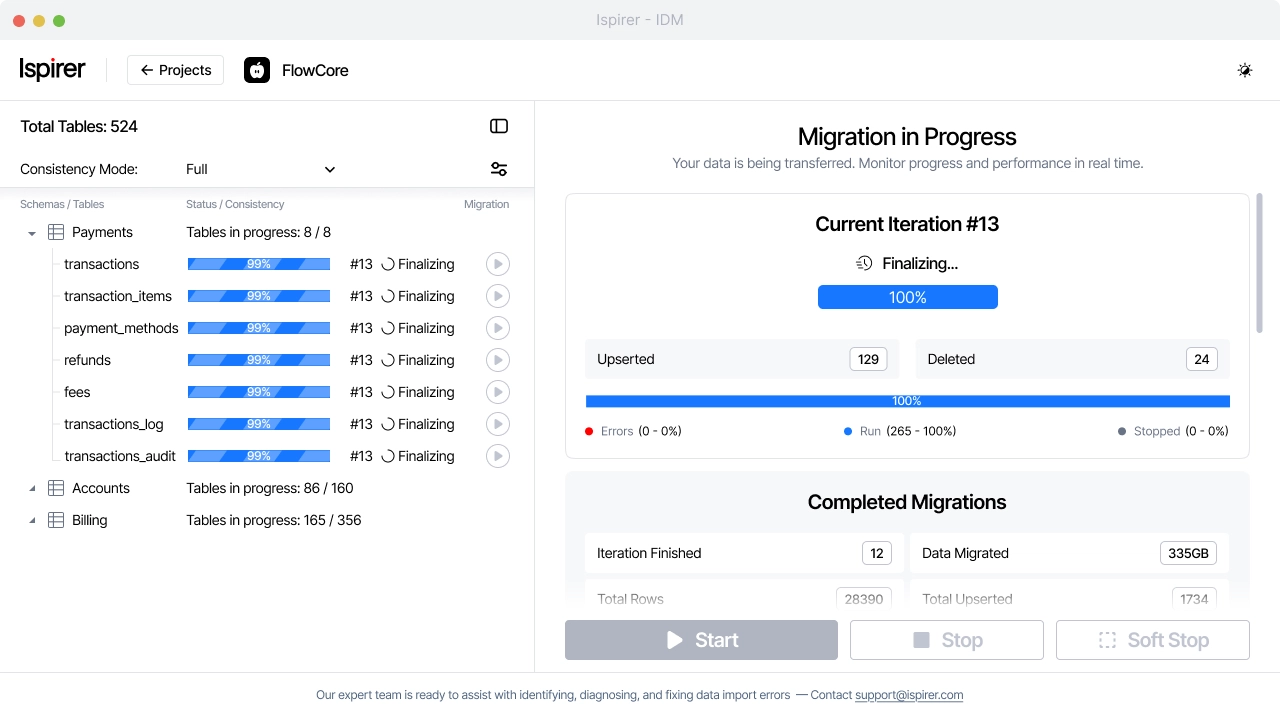
Security note: Ispirer Data Migrator operates with read-only access to your source data. No data is modified, deleted, or stored on Ispirer's side at any point during the migration process.
Take control of your migration project
Whether you’re migrating applications, data, or infrastructure, stay in control from the first assessment to final cutover.
How the tools compare
|
Capability |
AWS DMS |
Google Cloud DMS |
Azure DMS |
Ispirer Data Migrator |
|
AI data profiling |
✓ |
✓ |
✓ |
✓ |
|
Automated data mapping |
✓ |
✓ |
✓ |
✓ |
|
Real-time validation |
✓ |
✓ |
Partial |
✓ |
|
PII detection |
✓ |
✓ |
✓ |
✓ |
|
Legacy / non-standard sources |
Limited |
Limited |
Limited |
✓ |
|
No middleware required |
✗ |
✗ |
✗ |
✓ |
|
Vendor-agnostic |
✗ |
✗ |
✗ |
✓ |
The era of intelligent data migration
The era of treating data migration as a brute-force manual task is over. Today's AI data migration tools provide deep data profiling, automated field mapping, real-time integrity validation, and compliance-aware PII detection: capabilities that compress months of manual work into days.
The right tool depends on your source systems and destination. Cloud-native organizations moving to AWS, Google Cloud, or Azure will find strong native services. Organizations with legacy or mixed environments, or those requiring vendor-neutral tooling, will find Ispirer Data Migrator a more complete fit.
In either case, intelligent automation is no longer a competitive differentiator. It is a baseline expectation for any organization serious about modernizing its data estate.
People often ask
Can AI help migrate data?
Yes, and in 2026, it does so across every phase of the migration process, not just analysis.
Before migration begins, AI tools perform data profiling: scanning source data to understand its structure, identify quality issues, and map relationships between datasets. This initial profiling is crucial for planning a successful migration.
During mapping, AI automates what used to take weeks. It identifies corresponding fields across systems with different naming conventions, handles data type conversions, and flags inconsistencies before they reach the target.
During the transfer, AI performs real-time data validation, catching anomalies, truncation errors, and encoding issues that row counts would miss. Automatic PII detection ensures sensitive data is handled appropriately throughout.
The result: faster migrations, fewer errors, and greater confidence in data integrity at the destination.
What is the role of AI in cloud migration?
Cloud migration is one of the most common data migration scenarios, and AI plays a role across every phase.
In the planning phase, AI tools profile existing workloads and data volumes, then recommend the most cost-effective cloud resources for the target environment, helping avoid both under-provisioning (performance issues) and over-provisioning (wasted spend). Selecting the right ai tools for data migration at this stage significantly reduces both project risk and total cost.
During migration, AI handles automated data mapping and transformation for heterogeneous sources, manages continuous replication, and validates data integrity in real time.
In the security and compliance phase, AI scans the migration stream for PII and sensitive data, ensuring that personally identifiable information is flagged or masked before reaching the cloud environment, a critical requirement for financial institutions and organizations subject to GDPR or similar regulations.
How is AI used in data management beyond migration?
Beyond a one-time migration event, AI plays an ongoing role in data management. It monitors data quality, detects anomalies in access patterns, and flags suspicious activity such as unauthorized attempts to export large volumes of data.
AI also improves the day-to-day work of data teams: automating routine profiling tasks, surfacing data lineage issues, and reducing the time spent on manual data cleansing, freeing professionals to focus on analysis rather than preparation.
Do you have a migration project ahead?
Talk to expert. Save your time


