
Database Modernization for Retail: Our Guide for Developers
Summary: How can you approach large-scale database migration for a retail system safely and in a controlled way? Here you can learn about the pitfalls, best practices, and Ispirer’s experience with a large online fashion retailer.

In retail, database modernization usually fails not from bad architecture but from underestimating how much pricing, inventory, and order logic lives directly in stored procedures.
- A single price calculation can depend on region, campaign, user segment, and stock availability at once — migrating schema without preserving this logic breaks pricing or inventory accuracy.
- One fashion retailer migrated 8 TB and 1M+ lines of SQL from SQL Server to PostgreSQL in five months, requiring rewrites for case-insensitive comparisons, dynamic SQL, and constructs like TOP to LIMIT.
- Validation should continue after cutover — shadow reads and dual writes let teams compare order totals and status transitions under real traffic, not just pre-migration tests.
- Rollback difficulty varies by component: rolling back a read-only catalog is simple, but rolling back order processing or payments means syncing diverged data back to source.
Introduction
Retail systems rarely stay simple for long. As the business grows, they accumulate data, features, integrations, and edge cases; this is the point where the business may need to consider database modernization for retail. The systems gradually turn into complex platforms with millions of products, years of transactional history, and tightly interconnected services.
In practice, developers deal with systems where a significant part of business logic lives in stored procedures, critical queries are optimized for a specific database engine, and different components rely on implicit data behavior that is not always documented. At this point, modernization becomes less about introducing new architecture and more about understanding how the system actually behaves under real load.
Retail systems also operate under strict constraints. They must handle peak traffic during seasonal events, maintain consistent pricing across channels, keep inventory accurate in near real time, and process orders without delays. Even small inconsistencies in these areas can directly affect revenue, which makes any change inherently risky.
Where complexity actually comes from
In retail platforms, complexity is distributed unevenly. While the application layer continues to evolve, a large portion of critical behavior remains embedded in the database.
In practice, this logic typically includes:
- Pricing rules and discount calculations
- Promotion and campaign logic
- Inventory validation and reservation
- Order processing and status transitions
These mechanisms directly shape how the system behaves. For example, a single price calculation may depend on region, campaign, user segment, and stock availability at the same time.
This becomes especially important during modernization, when the system is being restructured or moved to a different database engine.
Because of this, database migration for retail is not just about transferring schema and data. It requires preserving how the system actually works.
An effective way to approach this is to treat the database as a codebase. Extracting SQL objects, identifying which ones are executed in production, and mapping them to business flows helps uncover hidden dependencies.
In most systems, only a subset of this logic is truly critical, but that subset must be handled with precision.
This is also why modernization efforts often fail early. Changes are introduced at the architectural level without fully understanding how much behavior depends on the database layer. As a result, even small differences can lead to incorrect pricing, inconsistent inventory, or broken order flows.
Why architecture alone doesn’t solve the problem
It is tempting to frame modernization as a transition to microservices or a move to the cloud. In retail systems, however, architecture is only part of the picture.
The deeper challenge is how tightly system behavior is tied to data handling. Queries often depend on collation rules, implicit ordering, or database-specific handling of NULL values. These details affect not only correctness but also how features behave in production.
For example:
- Product listings can change if sorting rules differ
- Pricing calculations may vary due to rounding or aggregation differences
- Inventory updates can behave differently under concurrency
These are not edge cases – they directly affect core business flows. That is why modernization needs to start with understanding data behavior before redesigning system components.
Data migration as a foundation, not the goal
In most retail modernization projects, data migration becomes the foundation for everything else. Without consistent data and preserved behavior, architectural improvements do not deliver real value.
This is where retail database modernization consulting firms like Ispirer come in, and solutions such as Ispirer SQLWays and Ispirer Data Migrator are typically used.
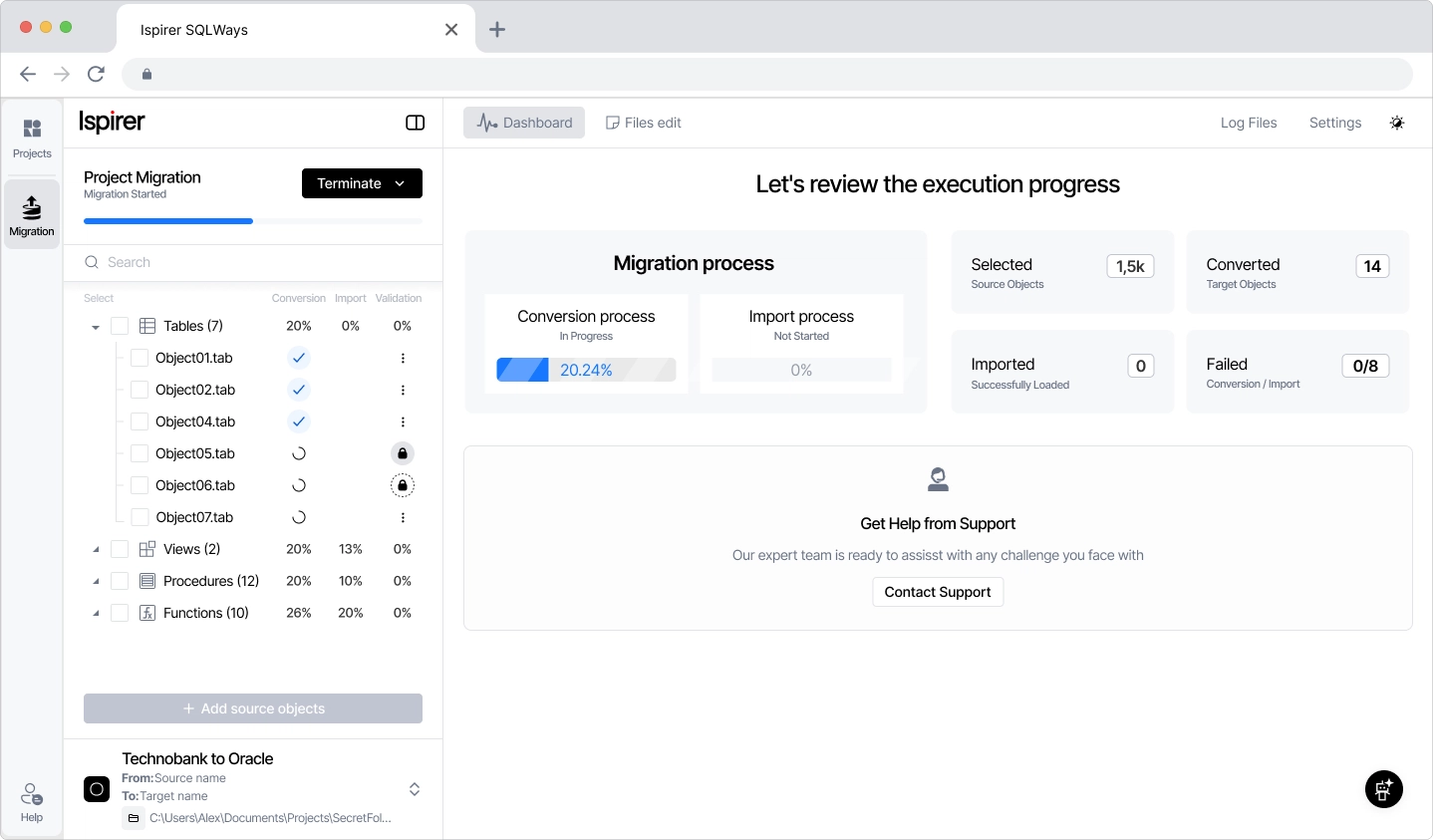
SQLWays converts schema and SQL logic, including stored procedures and dependencies. This significantly reduces manual rewriting, but developers still need to review complex areas such as dynamic SQL and vendor-specific constructs.
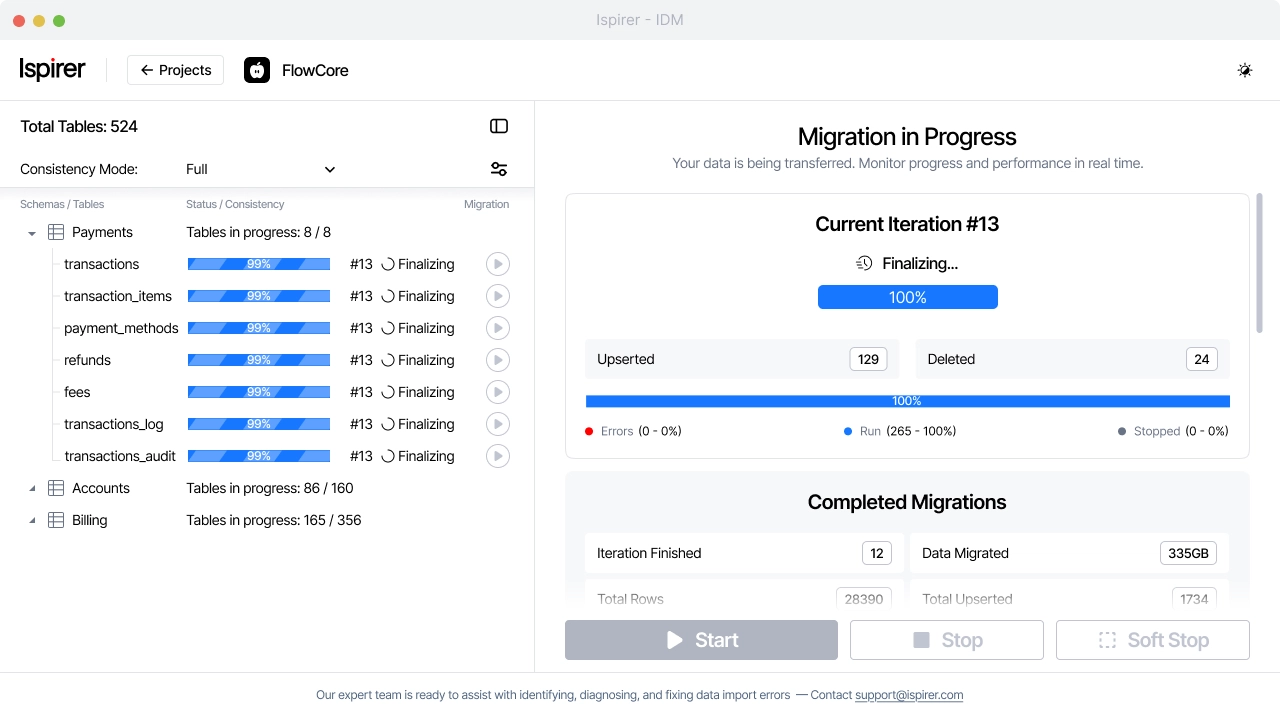
Ispirer Data Migrator handles data transfer and synchronization. It performs the initial load of historical data and then continuously applies changes so that the target system reflects ongoing activity. Because it works with read-only access to the source and runs on the target side, it minimizes impact on the existing system.
In practice, database migration becomes a controlled process where both systems run in parallel until data alignment is verified.
Before starting, it is important to focus on what actually matters in the system. A short preparation phase can significantly reduce risk. Developers typically:
- Identify the most resource-intensive queries
- Review stored procedures used in critical flows such as checkout or pricing
- Detect database-specific SQL that will require adaptation
- Prepare validation queries for ongoing checks
In many cases, analyzing slow query logs or APM data is the fastest way to identify critical paths.
Ispirer experience: migrating a high-load retail platform
A representative example comes from a large online fashion retailer that migrated its platform from Microsoft SQL Server to PostgreSQL on AWS.
The system handled around 8 TB of data and more than one million lines of SQL logic. Under peak load, especially during large campaigns, performance degradation began to affect checkout flow and overall user experience, while infrastructure costs continued to grow.
The migration required adapting logic that was closely tied to database behavior.
Several areas required particular attention:
- Case-insensitive comparisons had to be implemented explicitly
- Dynamic SQL used in pricing and catalog queries had to be rewritten
- Stored procedures responsible for order processing had to be restructured
Even standard constructs required changes, such as replacing TOP with LIMIT, GETDATE() with NOW(), and converting identity columns to sequences.
The migration was carried out in stages. Automated conversion handled most of the SQL logic, while developers focused on edge cases and validation as part of database migration services. Continuous checks ensured that pricing, inventory, and order processing behaved consistently.
“The project was completed in five months. After migration, the system handled peak load more efficiently and reduced operational costs without disrupting business operations.”
What changes after migration
After migration, the system typically behaves correctly, but not necessarily optimally.
Different database engines produce different execution plans, which affects performance of key retail flows such as product search, catalog filtering, and order aggregation. Queries that were efficient before may require redesign rather than simple tuning.

Testing with production-like data is essential, since many issues only appear at scale.
Where systems usually break
Most issues during modernization appear at the boundaries of the system rather than in its core logic.
Differences in data behavior are a frequent source of problems. Changes in collation or sorting can affect how products are displayed. Timezone differences can lead to incorrect reporting. Encoding issues may affect product descriptions or user-generated content.
Another category of issues comes from temporary data mismatches during migration. While systems operate in parallel, there may be short periods where newly created orders or inventory updates are not yet reflected in the target system.
In retail scenarios, this can affect:
- Availability checks
- Order status visibility
- Customer-facing updates
Integrations introduce additional complexity. Payment providers, ERP systems, and inventory services often rely on implicit assumptions about data format and timing. Even small deviations can lead to failures.
Concurrency-related issues are also common. High-load scenarios such as flash sales can expose race conditions in order processing or inventory updates that were not visible before.
Some of these issues only appear under real production load and cannot be reproduced in isolated environments. This is why testing complete business flows is essential.
Best practices for database modernization in retail: how to approach the transition safely
“Safe modernization in retail systems is less about speed and more about control.”
Running old and new environments in parallel and gradually shifting traffic allows developers to observe how critical flows behave without risking the entire system. This is especially important in retail, where even a small issue in checkout, pricing, or inventory can immediately impact revenue.
However, this approach only works when it is supported by concrete engineering practices rather than high-level ideas.
1. Establish traffic control early
Before migration starts, there must be a clear way to control where requests are processed.
A typical example is checkout traffic. Instead of switching everything at once, a small percentage of users can be routed to the new system while the rest continue using the existing one. This allows gradual exposure and makes it possible to react quickly if something goes wrong.
In practice, this is implemented through:
- Feature flags
- API gateway routing
- Application-level routing logic
The key requirement is that traffic switching should not require a deployment and must be reversible within seconds.
2. Ensure observability before migration starts
Without visibility, there is no control. During upgrade, database modernization consultants for retail enterprises need to track both technical and business metrics. A system can look stable from a technical perspective while already causing business issues.
At a minimum, monitoring should include:
- Latency (p95, p99) for critical endpoints such as checkout
- Error rates in payment and order flows
- Number of successful vs failed orders
- Data consistency between source and target systems
A common real-world scenario is when latency increases slightly after migration. Everything appears to be working, but conversion drops. Without proper observability, this type of issue is difficult to detect.
3. Validate behavior during runtime
Pre-migration validation is not enough. Even if data and logic look correct before cutover, differences often appear under real traffic and concurrency. That is why validation must continue while both systems are running.
Two practical approaches are widely used:
- Shadow reads, where requests are executed against the new system but the result is not returned to the user
- Dual writes, where data is written to both systems at the same time
For example, when an order is created:
- It is written to the source system
- It is also written to the target system
After that, developers can compare:
- Order totals
- Applied discounts
- Item lists
- Status transitions
This makes it possible to detect inconsistencies in real scenarios rather than relying only on test cases.
4. Define clear acceptance criteria
Migration decisions should not be based on intuition. Before rollout begins, it is important to define what acceptable system behavior looks like. This usually includes thresholds for:
- Replication lag
- Differences in key datasets (for example, order counts)
- Performance metrics
- Error rates
Without these criteria, the decision to proceed with cutover becomes subjective and increases risk.
5. Work with production-like data
Many migration issues only appear at scale. Queries that perform well on small datasets can degrade significantly when working with large product catalogs, historical orders, or complex joins. This is especially relevant in retail systems with high data volume.
Using production-like data, even if anonymized, allows developers to:
- Detect slow queries early
- Identify inefficient joins
- Evaluate memory and resource usage
Testing on small datasets almost always gives a false sense of confidence.
6. Plan for temporary data mismatch
While systems are running in parallel, short-lived differences between them are expected.
For example:
- An order is created in the source system
- It has not yet been replicated to the target
- A read request returns incomplete data
In retail scenarios, this can affect:
- Order status visibility
- Inventory availability checks
- Customer-facing updates
This is not a failure, but it must be understood and managed. Developers need to define where such inconsistencies are acceptable and where they are not.
7. Prepare realistic rollback scenarios
Rollback is often underestimated. Once writes are redirected to the new system, data begins to diverge. Returning to the previous system is no longer a simple traffic switch and may require additional steps.
Depending on the situation, rollback may involve:
- Synchronizing data back to the source system
- Temporarily freezing writes
- Limiting rollback to specific components
For example:
- Rolling back a read-only feature such as product catalog is relatively straightforward
- Rolling back order processing or payments is significantly more complex
This is why rollback scenarios should be designed and tested before they are needed.
If you would like a broader view of the retail system upgrades, explore our application modernization roadmap.
Why this matters during the database modernization process
“Most failures in database modernization for retail projects are not caused by technology itself, but by a lack of control during the transition.”
When traffic is managed, metrics are visible, and behavior is continuously validated, even large and complex retail systems can be modernized in a predictable way.
Without these mechanisms, even small changes can lead to issues that are difficult to detect and even harder to fix under production load.
Final thoughts on the database modernization approach
Modernizing retail systems requires balancing change with stability in an environment where data consistency and performance directly impact business outcomes.
The main challenge is not introducing new technology, but preserving the behavior that the business depends on. This includes pricing logic, inventory accuracy, and order processing under load.
Successful projects approach modernization as a controlled process. They validate behavior continuously, roll out changes gradually, and focus on how the system operates in real conditions.
For developers, this means going beyond architecture diagrams and working with the actual data, queries, and flows that define the system.
Table Of Content
- Introduction
- Where complexity actually comes from
- Why architecture alone doesn’t solve the problem
- Data migration as a foundation, not the goal
- Ispirer experience: migrating a high-load retail platform
- What changes after migration
- Where systems usually break
- Best practices for database modernization in retail: how to approach the transition safely
- Why this matters during the database modernization process
- Final thoughts on the database modernization approach
Do you have a migration project ahead?
Talk to expert. Save your time


